Test Footer

Showing posts with label Black and White. Show all posts

VideoTek Blogger Theme

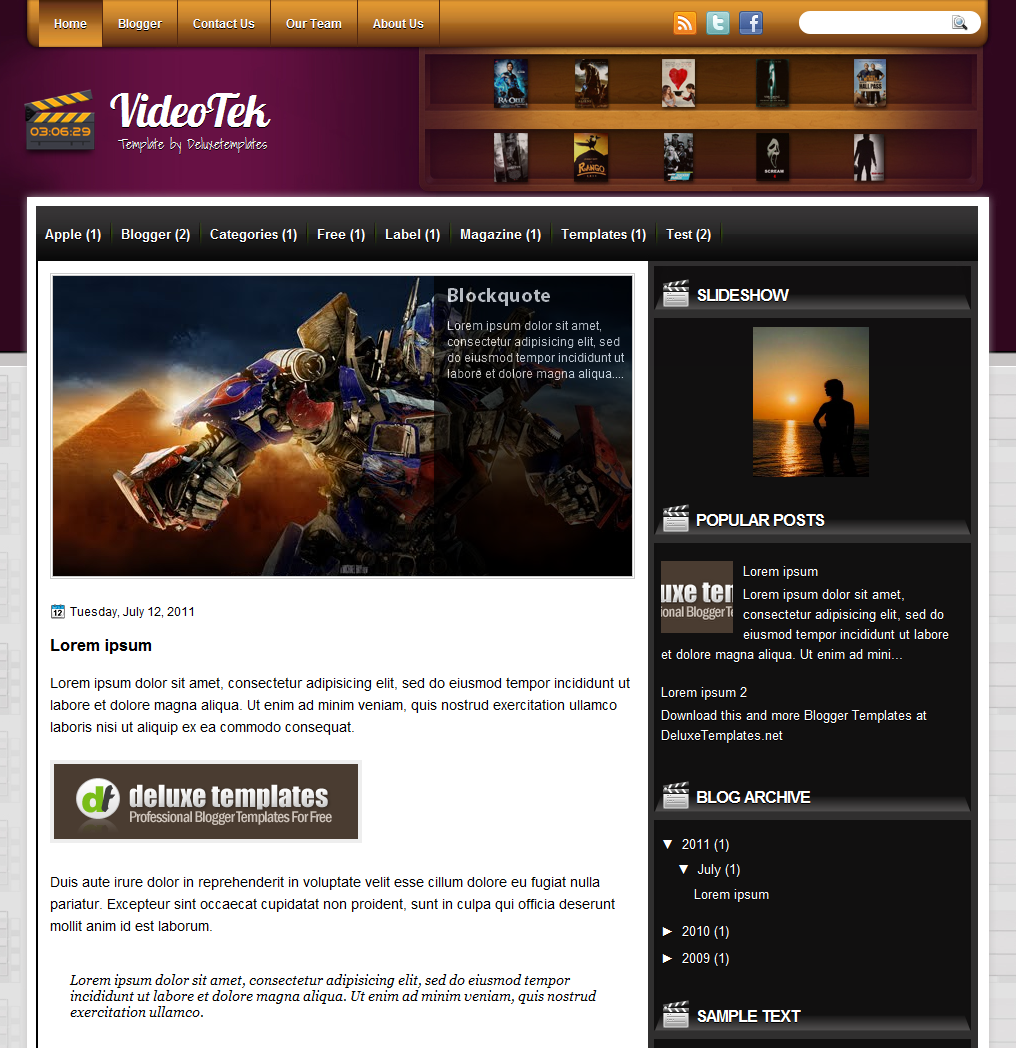
VideoTek is a 2 column template created by Theme Pix and ported to blogger by Deluxe templates. Its a movie-related theme with a featured content slider, social bookmarking icons, pages enabled and an internal search box.
VideoTek Blogger Theme
The first menu bar on top is used to display pages, so once you create a page, the link automatically appears on top. The social bookmarking icons next to it can be changed from Edit Html, search for this line, and replace deluxetemplates with your user name -

twitter.com/deluxetemplates

Similarly for facebook, search for -
facebook.com/deluxetemplates

Replace the user name with your facebook id. Now moving on the slider, the code is inserted in Design--Page elements under Featured Posts, click on edit and replace the relevant details in the code, like the image url, link, post headline and description, follow the same steps for all the slides and save -

<div id="s3slider">
<ul id="s3sliderContent">
<li class="s3sliderImage">
<img src="https://blogger.googleusercontent.com/img/b/R29vZ2xl/AVvXsEj_8v5OgnFXehrRoxR2sfw8wYwpkGk-argr_lyV7o9vDlUQvdmsDtP1ysBuPCBQYPeRY_zrczcYQLAb2TjfqExxOGGgFFcq-vdLjELCd6xsvoPlrD5MfmZwg8ArAlX1-oJXfrNRZ_dCB9m0/s1600/1.jpg" />
<span><strong><a href="POST_LINK#">Blockquote</a></strong>

<p>Sed dignissim mauris nec velit ultrices id euismod orci iaculis. Aliquam ut justo id massa consectetur pellentesque pharetra ullamcorper nisl...</p>
</span>
</li>

The second menu bar above the slider shows labels automatically. The right sidebar will show different blogger widgets - Archives, Popular Posts, categories etc., as per your choice.

Download the VideoTek Blogger Theme

Sonya Blogger Template

Sonya is a 3 column blogger theme created by Dzignine. It has a nice sliding effect for featured posts and a neat popular posts widget adjacent to it.
Sonya
The dual navigation bar are completely customisable from Design--Page Elements, locate the 'navigation' section, click the edit link and add your links in the new pop up window that opens.

You can place a banner ad in the header section. Now moving on the slider, go to Edit Html and look for this code -

<li><a href='#'><img src='#'/></a></li>

Replace the first '#' with your post link and the second '#' with your image url, save the changes. The theme has two sidebars on either side of the main column, the right column comes with the Popular Posts widget, sponsor ads, blog archive etc. While the left sidebar can be used for other blogger widgets.

The theme has two versions - Personal (withour slider and auto read more) and business (with slider and auto read more). You can download both from the link below

Download the Sonya Blogger Template

Simplex Focus Blog Template

SimplexFocus is a 3 column blogger theme created by Simplex Design. It has a neat layout with nice hover on effects, featured post section and horizontal recent comments and category bar.
Simplex Focus free Blog Template
In order to change the header logo, click on Design--Edit Html and look for this code -

<a rel="home" title="Home" href="http://simplexfocus.blogspot.com">

Replace it with this code and save the changes -

<a rel="home" title="Home" href="yoursite url">
<img src="logo url"/>
</a>

The first post is highlighted with a bigger image and post summary, and on the right is the search box, ad space and social media icons to allow your readers to subscribe or follow your latest updates. You can modify the account details from Edit Html, simply replace the text in bold, and repeat the steps for twitter, RSS etc., as well.

<div class="widget1" id="subscribe-follow">
<div class="h4">Like, Follow, and Subscribe</div>
<a rel="nofollow" title="Fan us on Facebook" href="http://www.facebook.com/simplexdesignblog" class="fan-on-facebook"></a>

Do the same with this code and replace the text marked in bold -

<div class="widget1" id="site-sns">
<a title="SimplexDesign on Facebook" href="http://www.facebook.com/simplexdesignblog" class="sns-facebook">
<span class="icon sns-facebook"></span> SimplexDesign on Facebook <span class="raquo">»</span>
</a>

Each subsequent post appears in a thumbnail format and on hovering on it the post is highlighted with a short brief and it also shows the number of comments. When you enter the post, the category shows up on top along with the author name, date stamp and social bookmarking icons. While the sidebar pops up with links and images of your previous posts.
Simplex Focus Blog Template
Below the main post area, recent comments and categories are displayed in a horizontal manner. To add links in the category bar, search for this code in Edit Html and insert the links and text -
<div id="popular-tags">
<span class="nav-title">Category : </span>
<a href="">lifestyle</a>
<a href="">faces</a>
<a href="">interests</a>
<a href="">youth</a>
<a href="">money</a>
<a href="">news</a>
<a href="">work</a>
</div>

Download the Simplex Focus Blog Template

Natural Paper Blogspot Template

Created by Dynamic WP and made available on blogger by Blogger Template Place, Natural Paper is a 2 column blogspot theme that can be used either for a nature or a personal blog.
Natural Paper Blogspot Template
Its got a catchy header space with the leaves and a transparent menu bar to display your categories. On the extreme right is the green RSS feed icon and below that your blog title will appear.

The look of the 2 columns is in the form of a diary page, so the main column has the author name, date stamp and comments below the headline and labels at the end of the post. Read More feature is also incorporated in the theme.

The single sidebar on the left includes the default blogger widgets and you can add more gadgets of your choice. The single column also has the Subscribe to Feed option. Overall. Natural Paper is a decent template with a simple layout.

Download the Natural Paper Blogspot Template

LK Magazine Blogger Template

LK Magazine Blogger Theme is originally created for blogger by Lasantha. Its a 4 column template packed with plenty of features, if you have lot of content, then you can consider using this template. Let's go through some of its features.
LK Magazine Blogger Template
The header space has a slot on the right for a banner ad, then comes the dual navigation bar - the first one also has a dropdown menu to add sub-categories. To configure the menu bars, access your Edit Html and search for the following code, and add your relevant links -

<li><a href='Your-Link-Here' title='Link-Title'>Link-Name-X</a>

The main post area has an image slider where you display your featured posts, image size would be width-200, height-120. In order to activate your slider, you will need to go to Layout-Page Elements and Add a Gadget. Paste the following code and replace the image links and post headline -

<div id="myslides">

<script type="text/javascript">
stepcarousel.setup({
galleryid: 'mygallery', //id of carousel DIV
beltclass: 'belt', //class of inner "belt" DIV containing all the panel DIVs
panelclass: 'panel', //class of panel DIVs each holding content
panelbehavior: {speed:500, wraparound:true, persist:true},
defaultbuttons: {enable: true, moveby: 2, leftnav: ['https://blogger.googleusercontent.com/img/b/R29vZ2xl/AVvXsEgQzTnlDKoVYqPWaxDCBi6Om0xAELsJHGFPHK5EZ31293MzTgvOM0ffPdd51Pg_wRWdCYX5dz6dI2wog6diMNC2b2uky206wcjvqhuohFfZfefxPzDjMCIac4rSXAMexbn8kVsM0WxrkQCM/', -14, 60], rightnav: ['https://blogger.googleusercontent.com/img/b/R29vZ2xl/AVvXsEgiHL0T3qgnBFk1YkNAp2Jawwjoytnf-98Bvgz57kAx1OkkoZQcFgS4SCL0Rjfx-PxIT2YfVevGBqLfEaFImyTlotNloUQUw13RfJTrwM_Zy1NoZBWZ9HcUYOxe5IHg-LpEhuBalBpfZoZp/', 0, 60]},
statusvars: ['statusA', 'statusB', 'statusC'], //register 3 variables that contain current panel (start), current panel (last), and total panels
contenttype: ['external'] //content setting ['inline'] or ['external', 'path_to_external_file']
})
</script>


<div id="mygallery" class="stepcarousel">
<div class="belt">

<div class="panel">
<a href="#" title="NFS Most Wanted">
<img alt="NFS Most Wanted" width="200" src="https://blogger.googleusercontent.com/img/b/R29vZ2xl/AVvXsEhX1gKYjkdxDwVkEiVnOf6Vr7LEuz68U3uQVVxxzcuya8cWDirgNZ3-Pe039nPGP-EmPFv6CgHJTzlU3lMkofsX94Qa6PwJKrJB-3iO2__uXY0yViVJhlJsn1JJeJ1opNaAir39qRvbgrpB/+Most+Wanted.jpg" height="120"/>
</a>
</div>

<div class="panel">
<a href="#" title="Call Of Duty">
<img alt="Call Of Duty" width="200" src="https://blogger.googleusercontent.com/img/b/R29vZ2xl/AVvXsEhB6hrnQLZDsQYyPd7foFia7bqKZ9TKADfj9cUlwElDndcq7JuJc2hlM6jRoPQNnCN-faqzvdM_HQkj69F9jOKy7mrY57kOLpnRO5ka0hsGqKKvnRX21PbMhdCQAS5ArWf_pfSl6rU4PbUr/+Of+Duty.jpg" height="120"/>
</a>
</div>

<div class="panel">
<a href="#" title="MaxPayne3 Game">
<img alt="MaxPayne3 Game" width="200" src="https://blogger.googleusercontent.com/img/b/R29vZ2xl/AVvXsEjnKFobyTmLDWhJCuguYRsGawzauHXCSzLHMc1HkOC4ExbZ3yuXXOlFxgpHgi0dVaHBamfeHRkD45wbtlkOQKTtR9t4V-PdRfBuVe-jH8rH3j5yVqBIpaEaDkwrUUeu2EOOGS7PP35cMjLg/+game.gif" height="120"/>
</a>
</div>

<div class="panel">
<a href="#" title="Tomb Raider">
<img alt="Tomb Raider" width="200" src="https://blogger.googleusercontent.com/img/b/R29vZ2xl/AVvXsEgJE2az_DH7rLEL8XDx4dSFjh8xpCW23FnlgN6bbvxFIfMElmVNnOmTNiL-_xX0bwVesEzfske81Uvqx7gKGTJMxCU0jg1m6Nqt4AvhyXyQOCPRJkHRE3IiVgp0W_ehjjSM0XW-lwv9hZLw/+Rider.jpg" height="120"/>
</a>
</div>

<div class="panel">
<a href="#" title="Harry Potter">
<img alt="Harry Potter" width="200" src="https://blogger.googleusercontent.com/img/b/R29vZ2xl/AVvXsEjsXT7pofJUw8nujh_sED93MCBbBNUzuMglcil_JAcHI8hz0qlQXVrs0czRfkPUo96KLlspyJsXf6zMbGkzZwLsbFM3yef70okRlzYBwQPBMZdk0WpKCf2Um7z7gqoRPoQrccF7O4jQqArF/+potter.jpg" height="120"/>
</a>
</div>

<div class="panel">
<a href="#" title="NFS ProStreet">
<img alt="NFS ProStreet" width="200" src="https://blogger.googleusercontent.com/img/b/R29vZ2xl/AVvXsEh5Y1pUuz4f_edI3-V7WtGWg0KCGKGUXpwcN_DSUsNSltcU-L83nJXUmUbSEZAb1cfSySBNSqCw-g5jEdLN4m5LjKZfMIDpJErmh1o9Z5b5OgaRCQTUeM_CwN17E9mwWS62XxmoZtpc3Au4/+ProStreet.jpg" height="120"/>
</a>
</div>

<div class="panel">
<a href="#" title="MaxPayne Movie">
<img alt="MaxPayne Movie" width="200" src="https://blogger.googleusercontent.com/img/b/R29vZ2xl/AVvXsEg9v39HS1ZPePT4e-55qUjjOOrU60gnEsGdREnkiGigoGpTCILVHFWjgXfrEMHHkG3sIV5-SyZhpphqsWIyAdxNG4znFatgx46NBa3iGSbVS1jXIeZLLT8bms2ndkQDpIgbvypxxLFwbWY9/+movie.jpg" height="120"/>
</a>
</div>

<div class="panel">
<a href="#" title="NFS Undercover">
<img alt="NFS Undercover" width="200" src="https://blogger.googleusercontent.com/img/b/R29vZ2xl/AVvXsEiTrr2OkvMNZ473S36kjqNDN5B7wWLyiP1_AWqJGwd1DOdq0EmGYJs07jxfXFLq9RNPLbu64Pfskr2RmYby75LFNuB0NkVma5pF00M7r8L2tqHJo-6C_zD7B0rimUvtejKVhVMdTtEBeZ1R/+Undercover.jpg" height="120"/>
</a>
</div>

</div>
</div>
</div>

The main posts appear below the slider, each post has the time stamp, author and comments below the headline. Read More function is also activated in this theme along with jazzy social bookmarking icons that appear after the short summary.

While the right column initially starts with the search box, ad slots and a multi-tabber and then splits in to two columns. To configure the tabs, go to Layout--Page Elements, click on the tab name and add a gadget. In case you want to change the tab names, access Edit Html and find the below code and change the tab names to sections of your choice -

<li class='pop'><a href='#tab11'>Video</a></li>
<li class='fea'><a href='#tab22'>Recent</a></li>
<li class='rec'><a href='#tab33'>Popular</a></li>
LK magazine 3 column footer
Another sidebar is on the right of the main posts, and you can use it to add any blogger widgets. LK Magazine theme also includes a 3-column footer section to display more content.

Download LK Magazine Blogger Template

Lasantha has released the second version of LK Magazine Blog Template -
Download the Version 2 LK Magazine Blog Template

Masipag Blogger Skin

Masipag is a 2 column theme originally designed by Paddsolutions and brought to Blogger by Anshul Dudeja. The template has few in-built features and widgets already installed in it. Let's take a look at it.
Masipag Blogger Skin
The header logo can be changed with your blog name by extracting the psd file from the main download folder, open it in photoshop, edit it and upload the logo from header widget in blogger layout. The header space also contains the menu bar for your main categories - Home, Contact and About - which can be changed from Layout-Edit Html, search for the following code and replace all the '#' with the relevant links -

<ul>
<li class='current_page_item'><a href='l'><span class='l'><span class='r'><span class='c'><span><span>Home</span></span></span></span></span></a></li>
<li><a href='#'><span class='l'><span class='r'><span class='c'><span><span>About</span></span></span></span></span></a></li>
<li><a href='#'><span class='l'><span class='r'><span class='c'><span><span>Contact</span></span></span></span></span></a></li>
</ul>

This is followed by a second menu bar to display your blog sections, that has a nice hover-on effect. The main feature of this theme would be the slider that allows you to put up your best or featured posts. To add the images, find the following code in Edit Html and replace # with post url and add your image link as shown in the code below. Repeat the same steps in the next code as well.

<ul class='jcarousel-skin' id='carousel'>

<li><a href='#'><img height='191px' src='IMAGE URL HERE' width='191px'/></a></li>

<li><a href='#'><img height='191px' src='IMAGE URL HERE' width='191px'/></a></li>

<li><a href='#'><img height='191px' src='IMAGE URL HERE' width='191px'/></a></li>

<li><a href='#'><img height='191px' src='IMAGE URL HERE' width='191px'/></a></li>

</ul>

In the main column the post headline is followed by the time stamp and labels on the top and comments on the extreme right. The template also has a related posts widget installed in it, that will appear at the end of each post.

The single sidebar on the right can be used for additional blogger widgets or the default ones like Archives, Labels etc. Masipag also has a 3 column footer space for more content.

Download the Masipag Blogger Template

Television Blogger Template

Template TV is a 3 column theme created by Templates Novo Blogger. As usual her themes are very interesting in terms of features and layout. Let's take a look. Blogger Template TV
This theme is ideally suited for movies or an entertainment blog. The header splits into two, one the left appears the blog title and one line brief of your blog, and the right you can insert a banner ad. Below that is the horizontal menu to add pages and categories. The header image has plasma TV images with shots of various TV soaps. You can download the PSD files of the plasma TVs in case you are keen on making changes in the header.

This theme is quite flexible, each post appears in a box and it can come in a expandable format or 'Read More' if you prefer. In case you are using the new post editor of blogger, then click on "Insert jump break" icon in the toolbar, and 'Read more' will be inserted in the post at your cursor position.
tv template read more
If you don't use the new post editor, you can still insert a jump break in Edit HTML mode by adding where you want to position the jump break. The images in the demo are the same size as the width of the column, if you want that feature, then ensure your images have 596px width and 120px height. In order to align it, add the code -

<div id='imagem-top'>IMAGE CODE HERE</ div>,:
align image in blogger template television At the end of the post appears the author name, labels, twitter and RSS feed icon, and the comments.

The sidebar is divided into three columns, one with full width at top and two columns are parallel below. At the top of the sidebar you can display images each other - width 338px and height 120px. To add the links, go to Layout-Page Elements, click on Edit Picture and add your image. In case you don't want the images on top, then delete each gadget.

The sidebar also allows you to add videos and an internal search box as well. Giving you extra space, the footer is divided into 3 columns to display additional categories or widgets.

Download the Blogger Template Television

Panorama Blogger Template

Panorama is a 2 column template designed by EZWPthemes and converted to blogger by Theme Craft.
Panorama Blogger Template
The template has a unique black and white city background design, which is suitable for a travel blog. The header is nice with various structures fitted into it, and small space for a welcome note. Below that is the menu bar and RSS subscribe icon.

In the main post area labels, time and date stamp appear below the headline, and each post also comes with social bookmarking icons, so your readers can submit your posts to various sites if they like it. While the comments are at the bottom of the post.

The sidebar is on the left of the template, starting with a search box followed by the regular blogger widgets - Recent Posts, Recent Comments, archive etc.

Download the Panorama Blogger Template

Digital Statement Blogger Theme

The Digital Statement blogger theme is an original design created by Blog Oh Blog! for wordpress and converted to blogger by labofweb.
Digital Statement Blogger Theme
To add to the bandwagon of fully functional magazine style themes here comes a digital statement that has quite a bit to add to the blogger platform. The template starts off like no other, a browse archive link is located at the top right hand side corner while the top left holds the date.

Then we have the blog title on the left and the right holds the go button, under that is a dual menubar though it does not offer a drop down system.

Then comes the main column on the left with automated readmore, the mini post on the homepage comes with a thumbnail image and at the bottom it has a bar that holds the date, labels, comments and the read more link.

The sidebar of this template has a featured section right on top where you can scroll through the top posts placed here. Under that is a highlighted about the author section. Then comes two tabbed widgits and after that is the twitter updates section.

The sidebar is then broken up into two parts and then comes the three column footer at the bottom, making it a perfect end to this wonderful theme!
Digital Statement Blog Footer
Download the Digital Statement Blogger Theme

Scarlett Blogger Template

Cahaya has definetly created a name for himself among blogspot users for his conversions of some of the finest wordpress themes by Jinsona. Today we take a look at the converted Scarlett Theme, in short its magnificent!
Scarlett Blogger Template
The Scarlett theme begins with a navigation menu right on top, under it comes the header image on the left while the right has a search bar neatly designed into the template. Under that is place for a leader board advertisement.

Now comes the drop down menu, before the slider that is found on many of the Zinmag Series Templates. The main column's posts are neatly divided with an automatic read more function. Under the headline is a neat icon for the Author and time stamp, while the end of the mini post has the labels. There is no comment count on the homepage which perhaps is good for a blog that does not receive too many comments!

The specialty of the sidebar is the auto rotating top posts, you can choose the content in this widget and it keeps rotating with a nice disappearing effect at a specified time delay.

Then comes a very sleek tabber that has a cool effect when you select the tabs, the sidebar starts off as a single column and then branches into two. You also have a sponsors section that you can knock off if you choose too.

The footer is divided into three columns with a special about me and twitter section with matching icons!

Download the Scarlett Blogger Template

Big Head Blogger Theme

Big Head is a 2 column blogger theme created by Pocket. His themes are original and quite different then the regular blogger templates. Big Head Blogger Theme
Big Head is a black and white template with a fixed design on either sides, so only the 2 columns would scroll. It has a left sidebar as well. OS beginning with the header, which is a rounded black box to fit in the blog title and description.

The design comprising a big head man on the right and the sign board on the left is ideal for a personal or people blog. The main column has the date above the post headline and author name, comments and labels appears below the post. Its on a plain white background while the sidebar has the subscribe option, you can use a black RSS icon there.

That's followed by the standard features in a blogger template, labels, archive and about me. There is no search box and menu bar in this template, you can fit in the categories and a search box in the sidebar.

Download the Big Head Blogger Theme

Marco Blogger Template

Template Marco is a neatly designed black and white template originally created by Templates Novo Blogger. Marco Blogger Template
Its a 2 column template that looks quite appealing in spite of being simple. Tha greyish black background is also the header colour where your blog title and description will come on the left. While one of the two navigation bar is on top right of the header, that can be used for your main links like Home, About etc.

The second navigation bar is on a grey strip with the search box on the right. Then starts the main column on a white background, and each post comes in a white box with the date stamp and headline on top, and author, labels and comments below it.

The second column also follows the same style, each feature comes in a black box and grey heading space. The subscribe feature appears on top, which is followed by the rest of your blog content. What more, this 2 column template also has footer space, in case you need more of it. There are 3 separate widget boxes at the bottom of the template.

If you like this theme, then you can go ahead and get it!

Download the Marco Blogger Template

Masinop Blogger Theme

Falcon Hive has brought yet another wordpress theme to blogger platform. This time its Masinop Blogger Template, that was originally made by Padd IT Solutions. Masinop Blogger Theme Masinop is a simple black and white 2 column template, and what makes it really interesting is the top multi-coloured bar. The theme doesn't have a header as such, except small space on the top left corner to add the blog title, and below that appears the sidebar.

The main column comes on the right side has a white background with standard features, except that every post starts off with an arrow protruding in the left column. The post has the date stamp, labels and comments below the headline. The left hand sidebar starts off with the subscription icons, email, RSS and readers can also subscribe to your twitter, and then comes the regular search box.

This template's navigation menu comes in the sidebar, instead of coming at the top of the blog. You can put your labels, archives or comments, or ad in the side column. Masinop is a nice and simple theme, so if your blog has less content this template is ideal.

Download the Masinop Blogger Theme

Tiny Studio Single Column Blogger Skin

There are very few single column blogger templates, so when a different one comes by I am overjoyed to put it up on the blog. Today we have the Tiny Studio template that was created by Pelangi Petang Productions for wordpress and ported to blogger by Zona Cerebral, lets see what this 1 column template has to offer!
Tiny Studio Single Column Blogger Skin
Most of the single column templates are used for photoblogs, though this one has more of a diary style theme, perhaps its because of the background image in the post of the notepad and pencil. Apart from that this template has some artwork in the background, the grass and plants that kick start the top of the design, some grass also finds it way to the end of the main column ending the design.

A header banner can be easily put in, and under that we have the navigation menu that has a hover on colour change. The Post header has a darkened colour, a prominent post date with the labels under the headline. The Author name and the comment count are below the post. Most single column templates have interesting footers, this skin has its footer divided into two columns, recent posts and a blog roll.

Each entry in the footer widgets comes with a neat icon besides it, that makes it quite interesting. Its nice to see a new single column layout with a structure that is not an exact structural copy as most of them end up being. If you like it you can download it from the link below :)

Download the Tiny Studio Blogger Template